


UNIQLO - Clothes Shopping
4.61.60K Reviews
App Specs
- Version
- 26.8.0
- Updated On
- License
- Free
- Downloads
- 1,000,000+
- Developer
- UNIQLO CO., LTD.
- Categories
- Shopping
- Platform
- Android, iOS
Screenshots

 Analysis by AppCompare
I find a dedicated clothing app most useful when I already have a general idea of what I need, but still want to compare colors, cuts, and sizes before committing. UNIQLO - Clothes Shopping is built around that sort of practical browsing: it brings the brand’s clothing and accessories into one place, rather than asking me to sift through a broad marketplace. That focus is its biggest advantage, though it also means the app makes the most sense if you are interested in UNIQLO’s range in the first place.
Browsing depends on a steady connection
Shopping on a phone is a back-and-forth process: I open a product, check its details, compare another option, then return to the first one. Those moments depend on the app loading current product information and images, so a reliable connection makes browsing feel much more fluid. On a weak signal, I would expect that rhythm to become less convenient; I would plan to do serious comparison when I have dependable internet rather than assume every part of the experience will work without it.
First impressions and what the app is for
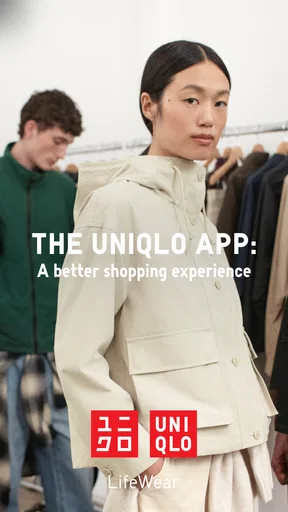
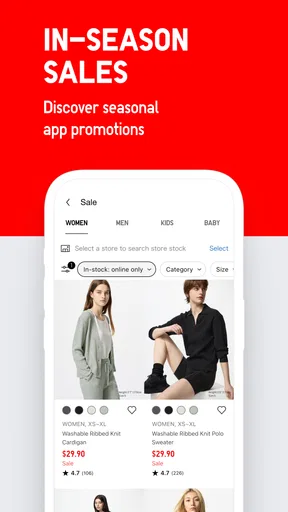
When I first opened the UNIQLO - Clothes Shopping app, I was greeted with a clean, minimalist design that felt like a breath of fresh air. I mean, who doesn’t appreciate an app that doesn’t assault your senses with a barrage of colors and pop-ups? The homepage is straightforward, showing off the latest collections and deals, which is perfect for those of us who love a good bargain.
UNIQLO CO., LTD. makes this a focused shopping tool rather than a general fashion marketplace. The range is centered on the company’s own essentials, seasonal clothing, collections, and accessories. I’d recommend it to someone who regularly wears the brand and wants a direct way to browse its assortment. If your priority is comparing many labels in one checkout, a multi-brand retailer is likely a better starting point.
The app is free, and its Everyone age rating makes it broadly suitable for shoppers of different ages. It has a 4.6 average from around 10,000 ratings, with over a million installs. Those figures suggest it has found a sizable audience, but they don’t tell me whether a particular garment will suit my body or preferences; product details and careful sizing choices still matter more.
Navigation for a purposeful shopping trip
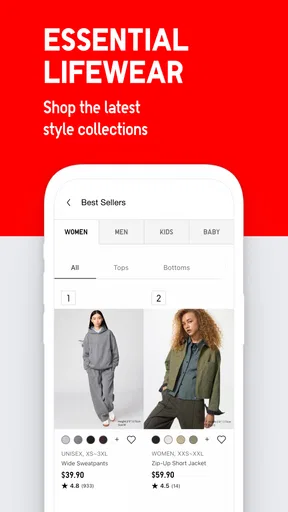
Getting around the app is a breeze. The bottom menu is where all the magic happens—think of it as your shopping command center. You’ve got your basic categories like Women, Men, Kids, and Sale, and each section is packed with filters to narrow down exactly what you’re looking for. I found the search function to be particularly snappy, which is a real blessing when you’re in a hurry.
A practical way to use those categories is to begin with the item, not the entire catalogue: search for the kind of garment you need, then narrow your choices by the available filters. That is especially helpful when you want to replace a familiar basic rather than browse for inspiration. I would still check the item page before making a decision, because a short product name alone cannot tell you whether the fabric or cut is right for your purpose.
Worth Reading Before You Choose

EA SPORTS FC Mobile 26 Is a Bigger Football Game, but It Takes Time

Flipboard Shows What News Apps Must Do Beyond the Feed

Switching to Android Auto Means Rethinking Your Driving Routine

Google Calendar Makes a Crowded Week Easier to Manage

Ludo King Makes the Most of the Minutes Between Plans

Baby Panda World Brings Quick Play to Modern Phones, but Its Game Library Feels Busy
What’s really cool is the ‘Favorites’ feature. Just tap the little heart icon, and you can save items to revisit later. It’s like building your own personal shopping list without the hassle of scribbling notes.
I find Favorites most useful as a comparison step, not merely a place to collect things. I can save a few possible colors or styles while browsing, then revisit them when I have time to think through what will work with clothes I already own. It also gives me a way to pause before buying. I would not treat a saved item as a guarantee that it will remain available, so if I need something for a specific occasion, I would return to the product and check its current details before relying on it.
Product pages, sizing, and the value of checking details
Now, let’s talk clothes. UNIQLO is famous for its high-quality basics, and the app is no different. Whether you’re hunting for a classic white tee or something a little more seasonal, you’ll find a nice variety here. The app even features special collections and collaborations, which are always fun to explore.
For someone building a repeatable wardrobe, the emphasis on basics can be more useful than an endless stream of trend-led choices. I would use the app to look for a dependable everyday layer, then treat seasonal pieces and special collections as a separate browse. That distinction helps keep a practical shopping trip focused while still leaving room to discover something less routine.
Each product page is detailed, providing all the information you need, from size guides to fabric details. There’s even a section with reviews from other shoppers, which I found incredibly helpful. It's like having a friend whisper advice in your ear while you shop!
My advice is to use those elements together rather than relying on a single clue. Check the size guide for the garment, read the fabric information to understand what you are considering, and use shopper reviews as another perspective—not as a substitute for your own fit preferences. If you are choosing between sizes or buying a cut you have not worn before, slowing down at this point is more useful than trying to make the decision quickly at checkout.
This also helps answer a common practical question: can I tell whether something will fit just by browsing the app? The app gives you information to make a more informed choice, but sizing is personal, and a guide or another shopper’s experience cannot promise a perfect fit. I would be especially careful with a new style or a gift, where familiarity with the item is limited.
A realistic mobile shopping routine
Imagine I notice that an everyday layer needs replacing while I’m out. I can search for that type of clothing, use the filters to reduce the options, and save a couple of candidates to Favorites rather than making a rushed choice between errands. Later, with a stronger connection and a few quiet minutes, I can compare their fabric and size information and decide whether either belongs in my cart.
That split between quick discovery and a more deliberate final check is where a phone-based store works well for me. It avoids having to remember product names or keep mental notes about alternatives. At the same time, I would not start an important purchase in a place where I may lose the connection midway through checking details or placing an order. The app supports convenient browsing, but a calm moment is still better for decisions where fit, timing, or several items matter.
Checkout, delivery, and when the app may not be enough
Once you’ve loaded up your cart, the checkout process is smooth and secure. You can save your payment details for future purchases, making the whole experience quick and efficient. Plus, they offer multiple payment options, catering to just about everyone’s preference.
For a returning customer, saved payment details can reduce repeated steps; for someone who prefers not to keep payment information in a shopping account, that convenience may not be worth the trade-off. I would make that choice deliberately rather than enable it just to save a moment. Either way, it is sensible to review the cart and the order details carefully before confirming a purchase.
Shipping is reasonably fast, and they often have promotions for free delivery, which is always a nice touch. Returns are straightforward too, in case something doesn’t quite fit the way you imagined.
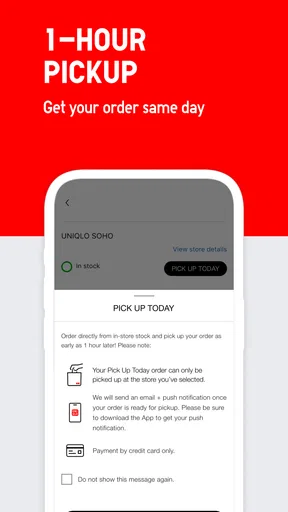
Delivery and return arrangements can affect whether online shopping is the right choice for a particular item. If I need clothing immediately, or I am unsure enough about fit that I want to try it on first, visiting a store or choosing another suitable way to shop may be more reassuring. For a routine purchase I know well, ordering through the app can be more convenient. I would check the relevant order and return information before buying, especially when timing matters.
Connection hiccups and a sensible recovery approach
Because browsing and checkout involve loading product information and completing a transaction, I would avoid repeatedly tapping a purchase button if a page stalls or the connection drops. First I would give the screen a moment, check whether the app has responded, and then review the cart or order status before trying again. That cautious sequence helps avoid confusion about whether an action went through.
If images or product pages are slow to load, switching to a more reliable connection before continuing is a practical fix. I would also keep track of the item I was considering—its name or place in Favorites—so I can return to it without starting the whole search over. For a time-sensitive purchase, I would not depend on an uncertain mobile connection to finish the process at the last minute.
Connectivity matters beyond checkout, too. A slow connection can interrupt comparisons and make it harder to inspect several options in one sitting. I find the best approach is to use the app when I can browse without rushing, save candidates as I go, and do the final review once the pages are loading normally. That is a more reliable workflow than assuming the app will behave identically on every network.
Data-conscious use and practical trade-offs
Clothing images and product pages are central to online shopping, so I would be mindful of how much browsing I do over a limited mobile data plan. If I am only looking for one specific item, searching directly and using filters can keep the session purposeful; opening collection after collection is more likely to turn a quick check into a long browse. When I have access to a connection I am comfortable using, I can spend more time comparing colors and details.
I would also keep Favorites tidy. Saving a small set of genuine alternatives makes later comparison easier, while adding every appealing item can turn the list into another catalogue to sort through. A useful habit is to revisit saved items before adding anything to the cart, remove options that no longer fit the need, and then check the details of the remaining choices. This makes the feature work like a shortlist rather than a source of distraction.
The app is not the right answer for every kind of clothing search. It is strongest when I want UNIQLO products and already have a rough idea of what I need. A department-store or multi-brand shopping app is better when I want to compare labels, and an in-person visit is better when trying something on is central to my decision. Knowing that distinction makes it easier to use this app for what it does well instead of expecting it to replace every other way of shopping.
Help when an order raises a question
I had a question about an order and decided to test out their customer support. The in-app chat function connected me with a representative in no time, and my query was resolved swiftly. It’s reassuring to know that help is just a few taps away.
That kind of support is particularly useful when the issue is tied to an order and I am already using the app to shop. If a question comes up during a connection problem, though, I would first make sure the app is loading reliably and keep the details of the order available. A clear, specific question is more practical than trying to reconstruct what happened after several interrupted attempts.
Who I’d recommend it to
I’d point regular UNIQLO shoppers toward this app if they want a focused way to browse familiar basics, look through seasonal options, and keep a short list of possible purchases. It can also suit someone buying for more than one person, since the category navigation gives a natural starting point for moving between different sections. The key benefit is having a direct route into this retailer’s range, not access to every clothing brand in one place.
I would suggest skipping it if you rarely shop at UNIQLO, prefer comparing many retailers side by side, or want to judge every garment in person before deciding. A general shopping marketplace is more flexible for cross-brand comparisons, while a physical shop is the more dependable choice when touch and try-on matter most. The right option depends less on which app has the tidiest screen and more on how you like to choose clothes.
Final thoughts on the connected shopping experience
Overall, the UNIQLO - Clothes Shopping app is a solid choice for anyone looking to streamline their shopping experience. It’s easy to use, offers a great variety of high-quality products, and provides excellent customer service. Whether you’re a seasoned UNIQLO fan or a newcomer to their style, this app is definitely worth a download. Happy shopping!
Its current version is 26.4.2, and it supports devices running Android 9 or later. I would install it for the convenience of browsing the brand’s range, saving possibilities, and handling a purchase in one place. My main caveat is simple: online shopping works best when I can load the details steadily and take time to make a considered choice. Used that way, it is a practical companion to shopping in person—not a replacement for trying something on when fit or urgency makes that important.
Pros
- User-friendly interface for easy navigation.
- Wide range of stylish and affordable clothing.
- Regular updates with new collections.
- Smooth and fast checkout process.
- Option to save favorite items for later.
Cons
- Limited international shipping options.
- Occasional app crashes reported by users.
- Some items may be out of stock quickly.
- Sizing may vary between different products.
- Lack of detailed product reviews.
FAQs for UNIQLO - Clothes Shopping
What features does the UNIQLO app offer?
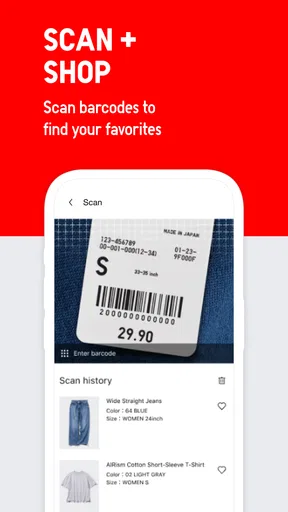
The UNIQLO app provides a seamless shopping experience with features like exclusive online deals, a personal wishlist, and notifications for new arrivals. It also includes a barcode scanner for in-store price checks, and a store locator to find the nearest UNIQLO outlets. The app ensures you're always updated on the latest fashion trends.
Is the UNIQLO app user-friendly?
Yes, the UNIQLO app is designed with an intuitive interface, making it easy for users to browse and shop. The navigation is straightforward, with categories clearly labeled for quick access. The app's layout allows for a smooth experience, whether you're searching for specific items or just browsing the latest collections.
Does the UNIQLO app offer any exclusive benefits?
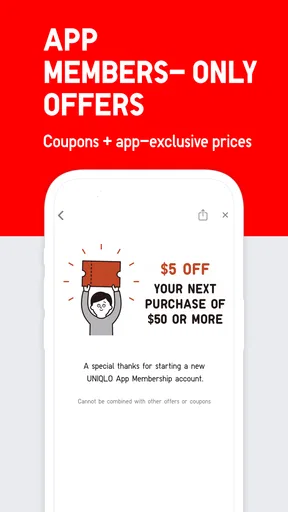
The UNIQLO app offers exclusive benefits such as app-only discounts, early access to sales, and special promotions. Users can also receive notifications about limited-time offers and restocks of popular items. These perks make the app a valuable tool for fashion-savvy shoppers looking for great deals.
Can I track my orders through the UNIQLO app?
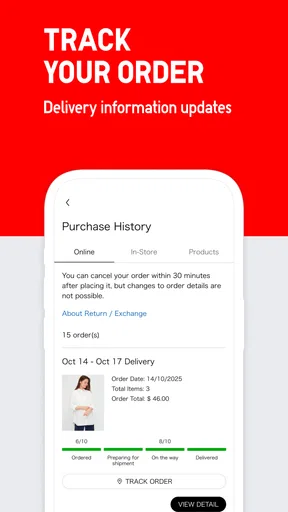
Yes, the UNIQLO app allows users to track their orders easily. After making a purchase, users can view the status of their shipments directly within the app. Notifications provide updates on processing, shipping, and delivery, ensuring that customers are informed throughout the entire process.
Is the UNIQLO app available globally?
The UNIQLO app is available in multiple countries, supporting a range of languages and currencies. However, availability and specific features may vary by region. It's advisable to check the app store in your country to confirm availability and any regional differences in features or product offerings.


